HRIS and ERP Integration: Connecting HR to NetSuite, Sage Intacct & Financial Systems
Connect your HRIS to NetSuite, Sage Intacct, or Acumatica. See which payroll vendors offer the best GL integrations and how to configure them for accurate financial data.

Every month, finance teams at mid-market companies face the same challenge: reconciling payroll data from HR systems with their general ledger. The numbers should match. They rarely do on the first pass.
Manual journal entries. CSV exports. Copy-paste errors. Timing mismatches between when payroll runs and when entries post. These friction points aren't just annoying—they delay monthly close, create audit risk, and consume hours that finance and HR teams could spend on higher-value work.
The solution is proper HRIS-to-ERP integration. When payroll data flows automatically from your HR system to your general ledger—with the right account mapping, dimensional coding, and timing—reconciliation becomes verification rather than investigation.
This guide covers how to connect your HRIS/HCM system to mid-market ERP platforms like NetSuite, Sage Intacct, and Acumatica, including which vendors integrate best and how to structure the integration for clean financial data.
Why GL Integration Matters More Than You Think
General ledger integration isn't a nice-to-have feature—it's a standard and expected part of any HRIS/HCM implementation. Here's why finance teams should insist on it:
The Real Cost of Manual Payroll-to-GL Processes
- Time consumption: Companies without automated integration typically spend 4-8 hours per pay period manually entering payroll journal entries. For bi-weekly payroll, that's 100-200 hours annually—just on data entry that should be automated.
- Error rates: Manual data entry has a 1-4% error rate. For payroll journal entries involving multiple expense accounts, departments, and locations, that translates to misallocated expenses, incorrect departmental budgets, and rework during close.
- Timing delays: When payroll runs on Friday but journal entries aren't posted until the following week, you're working with incomplete financial data. Real-time visibility into labor costs—often a company's largest expense—requires real-time integration.
- Audit exposure: Auditors scrutinize the connection between payroll records and general ledger entries. Manual processes without clear documentation create control weaknesses and extend audit timelines.
What Good Integration Looks Like
A properly configured HRIS-to-ERP integration should:
- Automatically post journal entries when payroll is processed—no manual intervention
- Map payroll data to the correct GL accounts based on earnings type, deductions, and tax categories
- Apply dimensional coding so expenses are attributed to the right departments, locations, cost centers, and projects
- Handle multi-entity structures for companies with subsidiaries
- Provide reconciliation reports that make verification straightforward
- Support bi-directional sync for employee data (new hires, terminations, changes)
When these elements work together, the monthly close process transforms. Finance teams verify that automated entries are correct rather than creating them from scratch.
The Three Mid-Market ERP Leaders
For companies in the 100-2,000 employee range, three ERP systems dominate: NetSuite, Sage Intacct, and Acumatica. Each has different strengths and different approaches to HR/payroll integration.
NetSuite
Overview: NetSuite (owned by Oracle) is the largest cloud ERP for mid-market companies. It offers native HR and payroll through SuitePeople, but many companies prefer to use specialized HRIS platforms and integrate them with NetSuite's financial modules.
Native HR/Payroll option: SuitePeople Payroll provides full-service payroll for US employees, with native integration to NetSuite's GL. This is the simplest path if you want everything in one system—but SuitePeople's HR capabilities are less robust than dedicated HRIS platforms.
Integration approach: NetSuite has an extensive partner marketplace (SuiteApp.com) with pre-built integrations for major HRIS and payroll vendors. The platform's open API also enables custom integrations.
Key integration partners:
- Rippling – SuiteApp certified; syncs HR, payroll, and GL data with real-time mapping to NetSuite dimensions
- ADP – Multiple connectors available through Flexspring; automated journal entries, employee sync, expense reimbursement
- Paylocity – Integration via Flexspring connectors; supports GL mapping and labor allocation
- Paychex – Pre-built connector for payroll-to-journal-entry automation
- Paycor – Direct integration for GL posting and employee data sync
- Paycom – CSV-based integration for GL data transfer
- UKG Ready – Connector available for workforce management and payroll integration
Integration considerations: NetSuite integrations often require Flexspring connectors (a third-party integration specialist) for the most robust automation. Flexspring's NetSuite-to-payroll connectors handle use cases including:
- Payroll journal entries (summary by subsidiary, department, or location)
- New hire and employee update sync
- Expense reimbursement automation
- Labor allocation codes for project costing
- Time card data for job costing
Implementation typically takes 8-10 weeks for a custom Flexspring connector deployment.
Sage Intacct
Overview: Sage Intacct is known for its dimensional accounting capabilities, making it popular with CFOs who need sophisticated financial reporting. The platform excels at multi-entity management and has strong traction in professional services, nonprofits, and healthcare.
Native HR/Payroll option: Sage Intacct Payroll (powered by ADP Workforce Now) provides an integrated solution for companies with 50+ US employees. This combines ADP's payroll processing with native Sage Intacct GL integration, developed collaboratively by both companies.
Integration approach: Sage Intacct Marketplace offers numerous HRIS and payroll integrations, with a focus on dimensional accounting that maps payroll expenses to departments, locations, projects, and custom dimensions.
Key integration partners:
- ADP Workforce Now – Deepest integration (powers native Sage Intacct Payroll); full dimension support
- Rippling – Direct integration for HR, IT, and payroll; GL sync with Sage Intacct dimensions
- Greenshades – Comprehensive payroll/HR with bi-directional Sage Intacct sync; automatic GL posting after each payroll run
- Deel – HRIS, payroll, and contractor management with accounts payable integration
- UKG – All-in-one HR and payroll with Sage Intacct connector
- APS Payroll – Mid-market-focused solution with automated GL and dimension sync
- Inova Payroll – Time-saving integration with dimension support
- Proliant – HCM platform with Sage Intacct integration
- Paycor – Uses CSV template upload for GL data (less automated)
- Paycom – CSV-based integration
Integration considerations: Sage Intacct's dimensional accounting is powerful, but integrations must be configured to take advantage of it. The best integrations map payroll data to multiple dimensions (department, location, project, class, etc.), not just basic GL accounts. This enables sophisticated labor cost analysis and departmental P&L accuracy.
Acumatica
Overview: Acumatica is the fastest-growing mid-market ERP, popular with construction, distribution, and manufacturing companies. The platform's consumption-based pricing (not per-user) makes it attractive for companies with many system users.
Native HR/Payroll option: Acumatica doesn't have native payroll—it relies entirely on partner integrations for HR and payroll functionality.
Integration approach: Acumatica Marketplace features certified integrations from major HCM vendors. The ADP Workforce Now Connector achieved Acumatica-Certified Application (ACA) status in 2024, setting a standard for integration quality.
Key integration partners:
- ADP Workforce Now – Acumatica-certified; automated payroll journals, real-time employee sync, project labor mapping
- Workforce Go! HCM – Popular choice with deep Acumatica integration; payroll, time, HR in unified platform
- Paycor – Strong job costing and project integration for construction/services
- Paychex – Time, HR, and payroll capabilities
- Paylocity – Integration for GL posting and HR data sync
- UKG – Enterprise features with Acumatica connector
- Ceridian Dayforce – Enterprise HCM with Acumatica integration capability
- Humanic Payroll – Global payroll solution with Acumatica connector since 2013
- HCM TradeSeal – Specialized connector for prevailing wage and union contractors
Integration considerations: Acumatica excels at project-based costing, making it popular with construction and professional services. The best HRIS integrations support labor cost allocation to projects, enabling accurate job costing directly from payroll data.
Integration Use Cases: What Data Flows Where
Understanding the specific data flows helps you evaluate integration capabilities and configure them correctly.
Use Case 1: Payroll to Journal Entries
What it does: After payroll processes, summarized payroll data automatically posts as journal entries in the ERP.
Data that flows:
- Gross wages by earnings type
- Employee deductions (401k, health insurance, etc.)
- Employer taxes (FICA, FUTA, SUTA)
- Employer benefit contributions
- Net pay amounts
Dimensional mapping: Journal entries should allocate expenses to:
- GL accounts (wages expense, payroll tax expense, benefits expense, etc.)
- Departments or cost centers
- Locations
- Projects or jobs (for project-based businesses)
- Classes or business units
- Subsidiaries (for multi-entity companies)
Best practice: Configure the integration to create summary journal entries per payroll run per subsidiary—not individual employee-level entries (which creates unnecessary GL clutter). Summary amounts should be grouped by the dimensions that matter for your reporting.
Use Case 2: Employee Data Sync
What it does: When employees are hired, terminated, or updated in the HRIS, changes sync to the ERP automatically.
Data that flows:
- New hire information (name, department, location, job title)
- Termination notifications
- Department or location transfers
- Manager changes
- Compensation changes (for budgeting purposes)
Direction: Most implementations use HRIS as the system of record for employee data, with one-way sync to the ERP. Some implementations support bi-directional sync for specific fields.
Best practice: Ensure employee IDs remain consistent across systems. Mismatched IDs create reconciliation nightmares and break automated processes.
Use Case 3: Time and Labor Allocation
What it does: Time tracking data flows from workforce management systems through payroll to the ERP, enabling accurate project and job costing.
Data that flows:
- Hours worked by project or job
- Labor costs allocated to specific work orders
- Overtime categorization
- Department or location labor hours
Best practice: For project-based businesses, this integration is non-negotiable. Configure time data to populate corresponding work orders in the ERP so job costing reports reflect actual employee hours worked on each project.
Use Case 4: Expense Reimbursement
What it does: Employee expense reimbursements processed through payroll automatically post to appropriate expense accounts in the ERP.
Data that flows:
- Reimbursement amounts by expense category
- Department allocation
- Project allocation (if applicable)
Best practice: Map expense categories in the HRIS to specific GL expense accounts so reimbursements don't all land in a generic "employee reimbursement" account.
HRIS-to-ERP Integration Matrix
Here's how the major HRIS/payroll vendors integrate with each ERP platform:
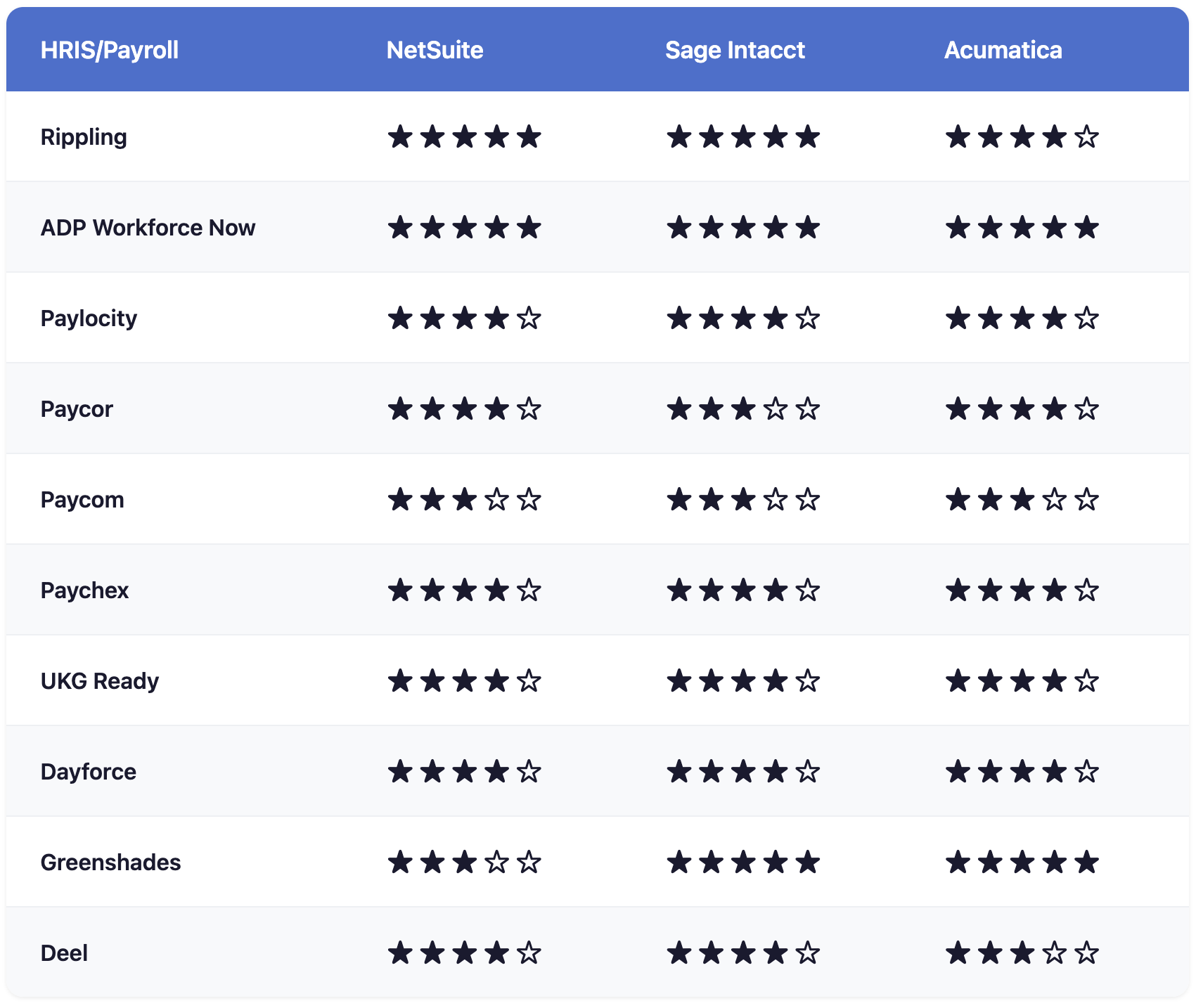
Rating key:
- ★★★★★ = Native/certified integration with full automation
- ★★★★☆ = Strong integration with some configuration needed
- ★★★☆☆ = Basic integration, may require CSV/manual steps
- ★★☆☆☆ = Limited integration capability
Implementation Best Practices
Before You Start
1. Document your chart of accounts mapping Create a detailed mapping document that shows exactly which payroll data elements post to which GL accounts. Include earnings codes, deduction types, tax categories, and employer contributions.
2. Define your dimensional requirements Decide which dimensions you need for reporting:
- Must-have: Department, Location
- Common: Project/Job, Class, Subsidiary
- Advanced: Customer, Grant (for nonprofits)
3. Establish data ownership Decide which system is the source of truth for each data element. Typically:
- HRIS owns: Employee data, org structure, compensation
- ERP owns: GL accounts, dimensions, financial transactions
- Shared: Cost center mapping, project codes
4. Plan for timing Understand when payroll runs and when you need journal entries posted. Real-time posting is ideal, but scheduled daily or weekly syncs work for most companies.
During Implementation
1. Start with a pilot Run the first few payroll cycles in parallel—posting both automated and manual entries—to verify accuracy before going fully automated.
2. Validate dimensional mapping Run test payrolls and verify that expenses land in the correct departments, locations, and projects. Incorrect dimensional mapping creates more rework than incorrect totals.
3. Build reconciliation reports Create reports that make it easy to compare HRIS payroll totals to ERP journal entries. The ability to quickly verify—not recreate—is the goal.
4. Document the integration Create runbooks that document how the integration works, how to troubleshoot common issues, and how to handle exceptions.
After Go-Live
1. Reconcile every pay period Even with automation, verify that journal entries match payroll totals. Catch issues early rather than during month-end close.
2. Monitor for drift When new earnings codes, deductions, or departments are added to the HRIS, ensure they're properly mapped in the integration. Unmapped codes often post to suspense accounts.
3. Review quarterly Each quarter, verify that year-to-date payroll totals in the HRIS match year-to-date payroll expenses in the ERP. Address any cumulative variances.
Common Integration Pitfalls
Pitfall 1: Treating Integration as an Afterthought
Problem: Companies select an HRIS based on HR features, then discover it doesn't integrate well with their ERP.
Solution: Include ERP integration as a selection criterion from the start. If your ERP is NetSuite, prioritize HRIS vendors with strong NetSuite integrations.
Pitfall 2: Insufficient Dimensional Mapping
Problem: Payroll expenses post to the correct GL accounts but don't include department or location coding, making departmental P&L reports inaccurate.
Solution: Configure the integration to map all relevant dimensions, not just GL accounts. Test with sample payrolls to verify dimensional accuracy.
Pitfall 3: Ignoring Multi-Entity Complexity
Problem: Companies with multiple subsidiaries configure the integration for one entity and assume it works for all.
Solution: Test the integration for each subsidiary. Verify that inter-company payroll scenarios (employees who work across entities) are handled correctly.
Pitfall 4: No Reconciliation Process
Problem: Companies assume automated integration means no verification needed.
Solution: Automation reduces errors but doesn't eliminate them. Build a lightweight reconciliation process that catches issues before they compound.
Pitfall 5: Skipping Employee Data Sync
Problem: Companies automate journal entries but continue manually entering new hires and terminations in both systems.
Solution: Implement bi-directional employee data sync to eliminate duplicate data entry and ensure systems stay aligned.
Choosing the Right Integration Approach
Option 1: Native Payroll (All-in-One)
When it works:
- You want maximum simplicity
- Your HR needs are straightforward
- You're already committed to the ERP vendor's ecosystem
Examples:
- SuitePeople Payroll (NetSuite)
- Sage Intacct Payroll powered by ADP
Pros: No integration to configure; single vendor relationship Cons: HR/payroll features may be less robust than specialized vendors
Option 2: Pre-Built Marketplace Integration
When it works:
- You need a specialized HRIS for HR capabilities
- A pre-built connector exists between your HRIS and ERP
- You want to minimize custom development
Examples:
- ADP Workforce Now → NetSuite (via Flexspring)
- Rippling → Sage Intacct
- Workforce Go! → Acumatica
Pros: Faster implementation; vendor-supported; proven track record Cons: May not support every custom requirement
Option 3: Middleware/iPaaS Integration
When it works:
- No pre-built connector exists
- You have multiple systems that need to share data
- You have internal technical resources
Examples:
- Workato, Boomi, or Celigo connecting HRIS to ERP
Pros: Flexibility; can connect any systems Cons: Higher implementation effort; ongoing maintenance required
Option 4: Custom API Integration
When it works:
- Unique requirements that marketplace connectors don't support
- You have development resources
- Volume or complexity justifies the investment
Pros: Exactly what you need Cons: Most expensive; longest timeline; ongoing maintenance
What to Ask HRIS Vendors About ERP Integration
When evaluating HRIS platforms, ask these specific questions about your ERP integration:
Do you have a pre-built integration with [NetSuite/Sage Intacct/Acumatica]?
- If yes, is it certified/marketplace-listed?
- Who built it (you or a partner)?
- How many customers use it?
What data flows automatically?
- Payroll journal entries?
- Employee data sync?
- Time/labor allocation?
- Expense reimbursements?
How is dimensional mapping handled?
- Can we map to departments, locations, projects, classes?
- How are new codes/dimensions handled?
What's the timing of data sync?
- Real-time, daily, weekly?
- Can we control when journal entries post?
What does implementation involve?
- Timeline?
- Who does the configuration (you, us, or a partner)?
- Cost?
How are integration issues supported?
- Who troubleshoots problems?
- What's the escalation path?
Need help selecting an HRIS with the right ERP integration? OutSail advises companies on HR technology selection, including evaluating integration capabilities with your existing financial systems.

.png)
