HR and Payroll Integration: When to Bundle vs. Keep Separate
Should you bundle or separate your HR and payroll software? Our decision framework helps you choose the right HR payroll system for your industry, size, and global footprint.

The HR and payroll software decision seems straightforward: pick one system that does both. Unified data, single vendor, no integration headaches. Simple.
Except it's not always that simple.
While the vast majority of businesses benefit from bundled HR payroll systems, there are real scenarios where separating HR and payroll makes strategic sense. The trick is knowing which camp you're in—and why.
This guide provides a decision framework for choosing between combined HR payroll software and a best-of-breed approach. We'll cover when bundling wins, when separation makes sense, and how to evaluate your specific situation.
The Default Choice: Why Most Companies Bundle HR and Payroll
Let's start with the baseline reality: most businesses should use a unified HR payroll system.
Here's why bundling typically wins:
Single Source of Truth
When HR and payroll live in the same system, employee data exists in one place. A new hire entered in HR automatically flows to payroll. A salary change updates everywhere instantly. A termination triggers final pay calculations without manual handoffs.
Separate systems require integration—and integrations break. Data gets out of sync. Someone gets paid incorrectly. Audit trails become fragmented. Troubleshooting means checking two systems instead of one.
Unified Rules Engine
Payroll isn't just about cutting checks. It's about applying rules: overtime calculations, benefit deductions, tax withholdings, PTO accruals, garnishments. These rules depend on HR data—job codes, departments, work locations, exemption status.
In a combined HR payroll system, the rules engine has direct access to all the data it needs. In separate systems, you're trusting an integration to pass the right information at the right time.
Simpler Vendor Management
One contract. One support team. One implementation. One renewal negotiation. One throat to choke when something goes wrong.
Managing two vendors means twice the administrative overhead, finger-pointing when issues arise ("that's a payroll problem, not an HR problem"), and complex coordination during implementations and upgrades.
Lower Total Cost
Two systems means two subscriptions, two implementations, and ongoing integration maintenance. The math rarely favors separation unless there's a compelling functional reason.
For a deeper look at how HR and payroll systems are structured, see our guide to the four types of HR payroll systems.
The Decision Framework: Bundle or Separate?
Before defaulting to bundled HR and payroll software, run through this framework:
Question 1: Does a Single Platform Meet Your Needs in Both Areas?
This is the threshold question. If a unified HR payroll system can handle your requirements in both HR and payroll, you should almost certainly bundle.
Bundle if:
- Your payroll is relatively standard (single country, straightforward pay rules)
- Your HR needs fit within mainstream platform capabilities
- You're a US-based company with US employees (most platforms handle this well)
- You don't have industry-specific payroll complexity
Consider separating if:
- Your payroll has specialized requirements that mainstream HR platforms can't handle
- Your HR needs significantly outpace what payroll-centric vendors offer
- No single platform serves both needs at the level you require
Question 2: What Industry Are You In?
Certain industries have payroll complexity that general-purpose HR payroll systems simply can't match.
Industries where separation is common:
- Construction – Prevailing wage, certified payroll, union rules, job costing
- Manufacturing – Complex shift differentials, piece-rate pay, union contracts
- Healthcare – Credential tracking, complex scheduling, multiple pay rates
- Hospitality – Tip pooling, tip credits, high-turnover seasonal workforce
In these industries, payroll often runs through an ERP or industry-specific system that handles the financial complexity but lacks robust HR features. The solution: pair specialized payroll with a best-in-class HRIS.
Question 3: How Global Is Your Workforce?
Global payroll is where the bundled approach most often breaks down.
Here's the reality: very few platforms can process payroll natively across dozens of countries while also delivering robust HR functionality. The platforms that excel at global payroll (like ADP Global, Deel, or Remote) often have lighter HR features. The platforms with comprehensive HR (like Workday or SAP SuccessFactors) require payroll integrations for many countries.
Bundle if:
- Single-country operations (especially US, UK, Canada, Australia)
- Small international presence (1-2 countries with limited headcount)
- Your chosen platform has native payroll in your specific countries
Consider separating if:
- Employees in 5+ countries
- Countries where your HRIS doesn't process payroll natively
- Need for Employer of Record (EOR) services in countries without legal entities
The common hybrid approach: a global HRIS for core HR functions integrated with a global payroll partner or EOR for countries where native payroll isn't available.
Question 4: What's Your Company Size and Resources?
Enterprise companies have options that mid-market and small businesses don't.
Large enterprises (2,500+ employees) often separate by design. The HR team selects an enterprise HCM platform (Workday, Oracle HCM, SAP SuccessFactors) for talent management, workforce planning, and employee experience. The payroll team—often a separate function entirely—selects a payroll specialist (ADP, Dayforce) optimized for accuracy, compliance, and scale.
This works because enterprises have:
- Dedicated teams to manage multiple vendors
- Budget for proper integration development
- IT resources to maintain connections
- Bargaining power to hold vendors accountable
Mid-market companies (100-2,500 employees) rarely benefit from this approach. The overhead of managing separate systems typically outweighs any functional advantages. Unless you have a specific forcing function (industry complexity, global footprint), bundled HR and payroll software is almost always the right call.
Small businesses (under 100 employees) should absolutely bundle. The administrative burden of separate systems makes no sense at this scale.
Three Scenarios Where Separating HR and Payroll Makes Sense
Based on Brett's experience advising hundreds of companies, here are the three most common scenarios where separating HR and payroll is the right choice:
Scenario 1: Construction and Heavy Industries
The situation: You're a construction company, utility contractor, or similar field-heavy business. Payroll is complicated—prevailing wage requirements, certified payroll for government projects, union rules, multi-state tax complexity, job costing tied to projects.
Why bundling fails: General-purpose HR payroll systems can't handle this complexity. They weren't built for Davis-Bacon compliance, fringe benefit calculations, or certified payroll reporting. Trying to force-fit construction payroll into a mainstream HR platform creates compliance risk and administrative nightmares.
The solution: Run payroll through your ERP (Sage, Procore, Vista, Foundation) or a construction-specific payroll system like Miter. Pair it with a best-in-class HRIS for employee records, onboarding, benefits administration, and talent management.
What to look for:
- HRIS with strong integration to your ERP/payroll system
- Payroll system that handles certified payroll and prevailing wage automatically
- Clear data ownership (HR system as master for employee data, payroll system as master for earnings)
Common pairings:
- Sage or Vista (payroll) + BambooHR or Paylocity (HR)
- Miter (construction payroll) + standalone HRIS
- Procore (project management) + specialized construction payroll + HRIS
Scenario 2: Global Companies Without a Unified Option
The situation: You have employees in 10+ countries. You need robust HR capabilities—performance management, talent development, workforce analytics—across all locations. But no single platform can process payroll natively in all your countries.
Why bundling fails: You face an impossible choice. Pick a global payroll provider and accept limited HR features. Pick a comprehensive HCM platform and manage payroll integrations in half your countries anyway. Neither option is truly "bundled."
The solution: Embrace the hybrid approach intentionally. Select your HRIS based on HR capabilities, then layer in global payroll through a partner or EOR where native payroll isn't available.
What to look for:
- HRIS with strong global payroll partnerships and pre-built integrations
- Global payroll provider that can consolidate reporting across countries
- Clear data flow: HR system pushes employee/compensation data to payroll, payroll pushes actuals back
- EOR capabilities for countries where you don't have legal entities
Common pairings:
- Workday (HCM) + ADP Global or CloudPay (payroll)
- SAP SuccessFactors (HCM) + country-specific payroll providers
- HiBob or Personio (HRIS) + Deel or Remote (EOR/global payroll)
- Darwinbox (APAC HCM) + regional payroll providers
Scenario 3: Large Enterprises with Specialized Teams
The situation: You're a large enterprise with 5,000+ employees. HR and Payroll are separate departments with different leadership, different priorities, and different evaluation criteria. HR wants world-class talent management. Payroll wants bulletproof accuracy and compliance.
Why bundling can fail: No platform is best-in-class at everything. Workday has incredible talent features but payroll that some find limiting. ADP has unmatched payroll expertise but HR that feels dated. Forcing both teams onto one platform means someone compromises.
The solution: Let each team select the best tool for their function, then invest in proper integration.
What to look for:
- Enterprise HCM with robust integration APIs
- Payroll provider experienced in enterprise integrations
- Dedicated integration resources (internal or partner)
- Clear data governance and ownership model
- Executive alignment on the approach
Common pairings:
- Workday (HCM) + ADP (payroll)
- Oracle HCM Cloud (HCM) + Dayforce (payroll)
- SAP SuccessFactors (HCM) + ADP or in-country payroll providers
Important caveat: This approach requires significant resources to execute well. Integration development, ongoing maintenance, data reconciliation, vendor coordination—it's real work. Don't pursue this path unless you have the team and budget to support it.
How to Evaluate Combined HR Payroll Software
If you've decided bundling is right for you, here's how to evaluate unified platforms:
Core Capabilities Checklist
HR Side:
- Employee records and org charts
- Onboarding workflows
- Benefits administration
- Time and attendance
- PTO management
- Performance management
- Reporting and analytics
Payroll Side:
- Pay processing accuracy and reliability
- Tax filing and compliance
- Direct deposit and payment methods
- Garnishment handling
- Year-end processing (W-2s, etc.)
- Multi-state tax support
- Audit trails and reporting
Questions to Ask Vendors
- Is payroll native or integrated? Some "bundled" platforms actually integrate third-party payroll. This matters for data consistency and support.
- What's your payroll accuracy rate? Look for 99.9%+ accuracy with documented error resolution processes.
- How do HR changes flow to payroll? Understand the timing—real-time, daily batch, or manual sync?
- What happens when payroll has an error? How are corrections handled? Who takes responsibility?
- How do you handle complexity? Multi-state, tipped employees, multiple pay rates, retroactive changes?
Red Flags
- Payroll feels bolted on. If the vendor acquired payroll recently or partners with a third party, dig deeper on integration quality.
- HR drives everything. Some platforms have excellent HR but treat payroll as an afterthought. Payroll errors are expensive.
- Can't explain the rules engine. If they can't clearly articulate how HR data triggers payroll calculations, the integration may be superficial.
How to Evaluate Separate HR and Payroll Systems
If separation makes sense for your situation, here's how to approach it:
Integration Requirements
Must-have data flows:
- Employee demographics (HR → Payroll)
- Compensation changes (HR → Payroll)
- Job and position data (HR → Payroll)
- Deduction and benefit enrollments (HR → Payroll)
- Time and attendance data (Time → Payroll, if separate)
- Payroll actuals and YTD data (Payroll → HR)
- General ledger entries (Payroll → Finance)
Questions to ask:
- What pre-built integrations exist between these platforms?
- How frequently does data sync?
- What's the error handling process?
- Who owns the integration—you, the HR vendor, or the payroll vendor?
- What's the cost for integration setup and maintenance?
Data Governance
With two systems, you need clear rules:
- Which system is the master for employee data? (Usually HR)
- Which system is the master for earnings data? (Usually Payroll)
- How are discrepancies reconciled?
- Who has access to update which fields?
- What's the audit trail for changes?
Vendor Coordination
Separate vendors means potential finger-pointing. Establish upfront:
- Escalation paths when issues cross systems
- Joint implementation planning
- Shared go-live coordination
- Regular sync meetings between vendor support teams
Making the Decision: A Summary Framework
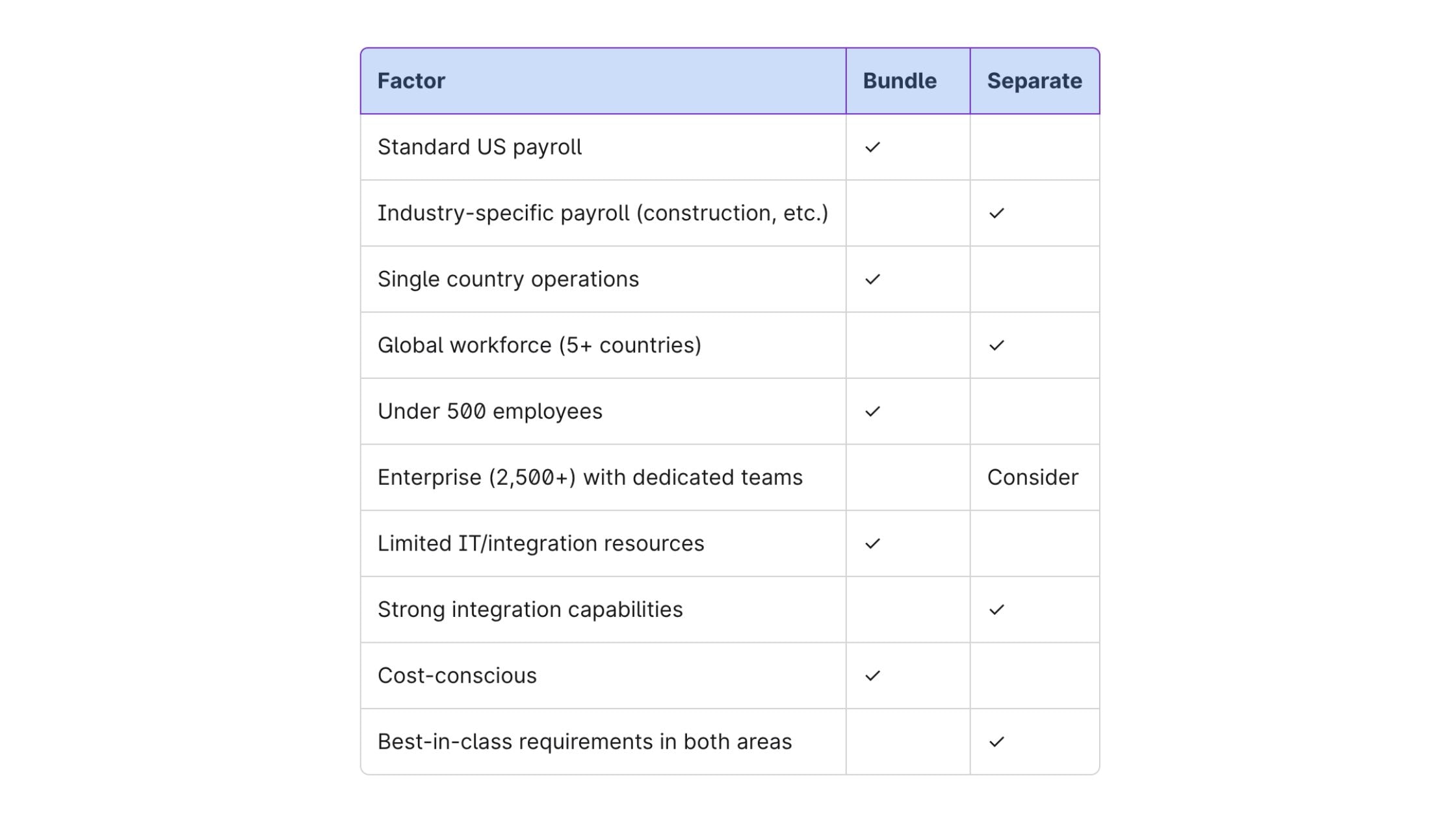
When in doubt, bundle. The burden of proof should be on separation. Unified HR payroll software reduces complexity, lowers risk, and simplifies vendor management. Only separate when you have a clear, compelling reason that bundled platforms genuinely can't address.
Need help deciding? OutSail has guided hundreds of companies through this exact decision.
Schedule a consultation to talk through your situation.
OutSail is an HR technology advisory firm. We help companies select and implement the right HR, payroll, and benefits technology. Our services are free to buyers—we're compensated by vendors only after successful implementations.
.png)
