How to Switch HRIS Vendors Without Disrupting Payroll: A Mid-Contract Migration Guide
Switching HRIS mid-contract doesn't have to mean payroll chaos. This guide covers parallel payroll runs, data sequencing, benefits feeds, and a migration checklist by company size.

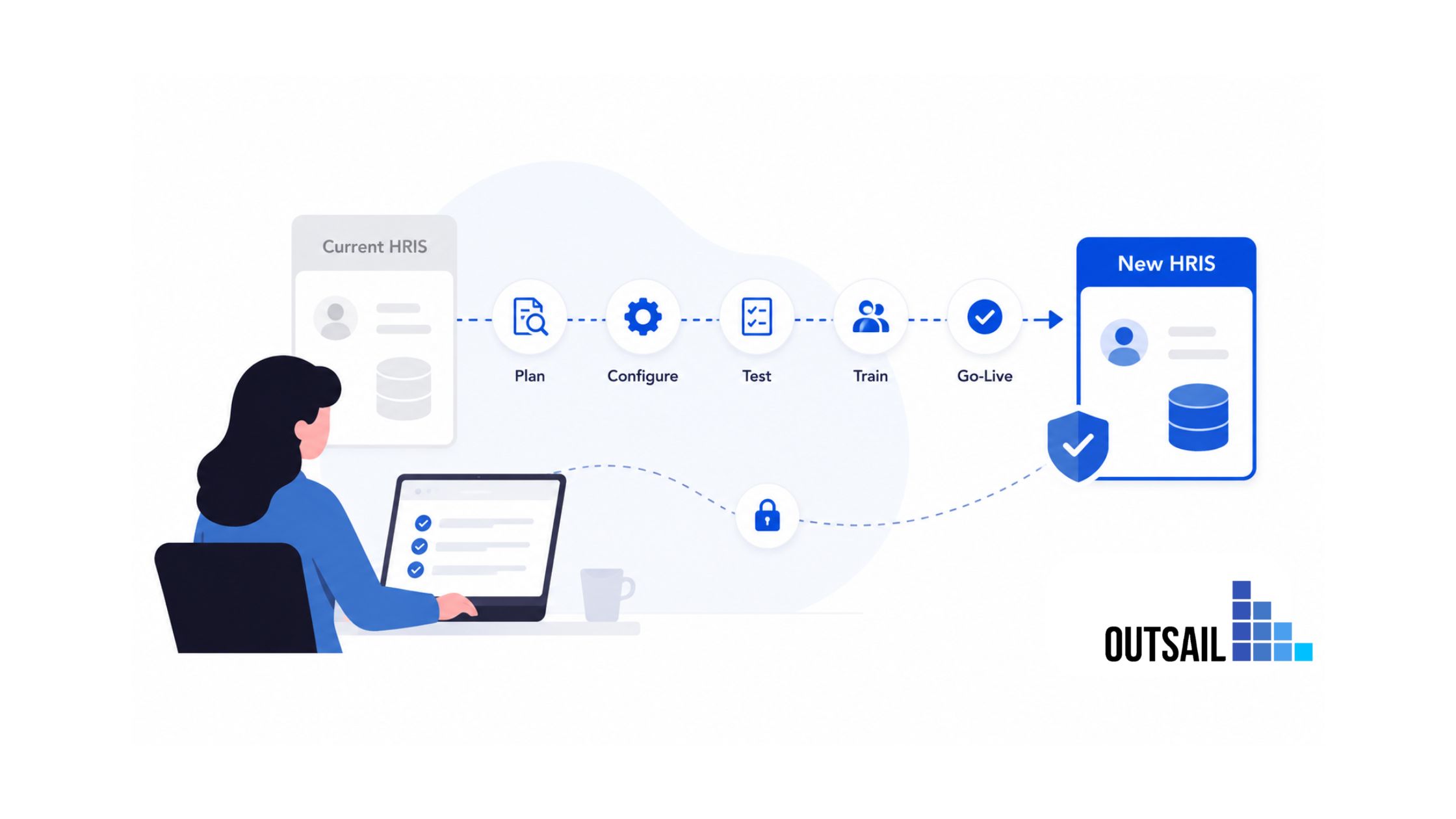
The fear is legitimate. Every HR leader who has seriously considered leaving their current HRIS has had some version of the same thought: what if we get it wrong and someone doesn't get paid?
Payroll errors are not merely operational problems. They erode employee trust faster than almost any other organizational failure. A missed paycheck, a wrong deduction, or a tax filing error that surfaces three months after go-live doesn't just create administrative headaches — it creates the kind of credibility damage that takes years to repair.
That fear, legitimate as it is, has kept organizations on underperforming HRIS platforms far longer than they should have stayed. They know the platform isn't working. They've built a business case for switching. But the prospect of executing a payroll migration alongside a full system cutover, mid-year, mid-contract, while the organization is still running on the old system — it feels like changing an engine mid-flight.
This guide is built to remove that fear — not by minimizing the risk, but by giving you the specific, sequenced playbook that experienced HR and payroll teams use to execute this transition without incident.
Switching HRIS vendors is a manageable risk. Staying on a system that doesn't serve your organization is a slow-burn cost. When you have the right migration framework, the first option becomes significantly less frightening than the second.
Before You Start: Resolve the Contract Question First
Everything in this guide assumes you have already addressed (or are actively addressing) your contractual obligations to your current vendor. This step comes before you talk to new vendors, before you build a migration timeline, and before you communicate anything to your team.
What to review in your current contract:
- Termination provisions. Most HRIS contracts carry early termination penalties — commonly structured as a percentage of remaining contract value, or as the lesser of remaining fees through the first anniversary and 50% of remaining contract value. Understand exactly what you owe before making any commitments to a new vendor.
- Notice requirements. Many contracts require 30–90 days written notice before termination, regardless of contract end date. Failing to serve notice on time can inadvertently trigger automatic renewal — potentially locking you into another year at current pricing.
- Data portability rights. Your contract should specify what data you're entitled to export, in what format, and within what timeframe after termination. If your contract is silent on this, negotiate it in writing before initiating an exit. You own your employee data; your ability to export it cleanly is non-negotiable.
- Migration assistance. Some vendors include data export support or transition cooperation as a contract term. Others charge separately. Know what you're entitled to and what you'll need to pay for.
The most expensive HRIS migrations are the ones where organizations signed a new vendor contract before understanding the full exit cost of the old one. OutSail's guide to HRIS contract negotiation clauses covers data portability provisions, termination structures, and the specific language to negotiate that protects your exit options — ideally before you sign your next contract, but worth reviewing regardless.
Access OutSail's Implementation Support
OutSail's implementation advisory service helps HR teams execute vendor switches with a structured migration plan, implementation partner guidance, and payroll continuity review — at no cost to your organization.
Learn how OutSail supports HRIS implementations →
Phase 1: Data Audit and Migration Preparation (Weeks 1–6)
Data quality is the single biggest determinant of payroll migration success. The most sophisticated new HRIS platform in the world produces wrong paychecks when it receives wrong data. Every hour invested in data preparation before migration saves multiples of that time in error remediation after go-live.
Step 1: Conduct a Full Data Inventory
Before anything is migrated, you need to know exactly what you have.
Pull a complete data inventory from your current HRIS covering:
- Employee master data: Legal names, SSNs (or equivalent tax IDs), addresses, employment status, job titles, department codes, cost center assignments, work locations, and employment dates. Every field matters — a wrong work location produces wrong state tax withholding.
- Compensation records: Base salary, hourly rates, pay frequencies, any variable pay structures (bonuses, commissions, shift differentials), and effective dates for any mid-year changes.
- Tax withholding configurations: Federal, state, and local withholding elections for every employee. W-4 data, state equivalents, supplemental withholding instructions, and any special situations (nonresident aliens, tax treaty employees, multiple state workers).
- Year-to-date payroll history: Every payroll period's gross pay, deductions, employer contributions, and tax withholdings from January 1 through your migration date. This data is what your new system uses to calculate remaining annual maximums (401k, HSA, DCFSA, Social Security wage base) and to prepare accurate W-2s at year end. Missing or wrong YTD data produces year-end filing errors that surface six months after go-live.
- Benefits enrollment data: Coverage elections, effective dates, beneficiary designations, life event history, and pending enrollment changes. Note that benefits data is typically maintained in both the HRIS and separately with each benefits carrier — reconcile these two sources before migration, not after.
- Time and attendance accruals: PTO balances, sick time accruals, vacation carryover amounts, and any leave of absence records with pending return-to-work dates.
- Direct deposit configurations: Bank routing numbers, account numbers, split deposit instructions, and pay card assignments.
Step 2: Cleanse Before You Move
Data migration is not a copy-paste operation. It is an opportunity to fix every data quality problem that has accumulated in your current system — and a mandate to avoid carrying those problems into the new one.
Common data quality issues to resolve before migration:
- Employees with missing or incorrect work location (creating tax nexus errors)
- Terminated employees who remain in active status in the system
- YTD figures that don't reconcile with individual paycheck history
- Benefits elections that don't match what carriers have on file
- Duplicate employee records from acquisitions or system mergers
- Inconsistent cost center or department codes that don't match your chart of accounts
Assign a data owner for each record category. For payroll-specific data, this should be your payroll manager or a senior payroll specialist — not a generalist HR coordinator. Errors in payroll data are not recoverable with a quick fix. They require amended filings, employee corrections, and in some cases, IRS correspondence.
Step 3: Map Data Fields Between Systems
Your current HRIS and your new platform will not use identical data structures. A field called Employee_ID in one system may be Emp_Identifier in another. Compensation grades may be structured differently. Department codes may need to be remapped to a new chart of accounts.
Build a data mapping document — field by field — between the two systems before any migration begins. Your new vendor and implementation partner will help with this, but your team needs to validate every mapping against your actual data, not just the vendor's template.
Pay particular attention to:
- How the new system handles mid-period pay rate changes
- How historical pay periods are stored (does the new system need full transaction history, or just YTD balances?)
- How multi-state employees are configured for tax jurisdiction assignment
- How the new system handles any custom fields or non-standard pay codes that exist in your current system
Phase 2: Parallel Payroll Runs — the Safety Net That Makes Migration Survivable
Parallel payroll is the single most important risk management tool in any payroll migration. Run it without exception.
What Parallel Payroll Actually Means
Parallel payroll does not mean paying employees twice. It means processing a complete payroll cycle in both your old system and your new system for the same period, comparing the outputs line by line, and identifying any discrepancies before real money moves through the new system.
The goal is verification, not duplication. Your old system processes normally and employees are paid as usual. Your new system runs the same period in simulation — every calculation, every deduction, every tax withholding — producing an output that you compare against the old system's results.
Discrepancies are your signal that something in the configuration, data migration, or calculation logic needs to be corrected before go-live.
How Many Parallel Runs to Conduct
Industry practice calls for a minimum of two complete parallel payroll cycles before go-live.
For organizations with any of the following complexity factors, run three:
- Multi-state payroll with employees in five or more states
- Hourly workforces with overtime, shift differential, or complex scheduling rules
- Recent mid-year compensation changes that affect YTD calculations
- Benefits changes from open enrollment that affect deductions
- Any employees on leave (FMLA, disability, workers' compensation) with modified pay calculations
The most common reason parallel runs surface discrepancies is configuration error in the new system — a tax rate that wasn't updated, a deduction code that wasn't mapped correctly, or a pay frequency that doesn't match. These are all fixable before go-live. They are substantially harder to fix after real paychecks have already been issued.
What to Compare in Each Parallel Run
For each employee, reconcile:
- Gross pay — Does the new system calculate the same gross for each pay code (regular, overtime, bonus, commission)?
- Federal tax withholding — Does it match, given the employee's W-4 elections and YTD wages?
- State and local tax withholding — Particularly important for multi-state employees and employees who live and work in different jurisdictions
- Benefits deductions — Do all pre-tax and post-tax deductions match, at the correct employee and employer amounts?
- Retirement contributions — Are 401(k), 403(b), or equivalent contribution amounts correct, and has the new system correctly tracked YTD against the annual IRS limit?
- Net pay — Does the final take-home amount match for each employee?
- Employer tax contributions — FICA, FUTA, SUTA, and any local employer taxes
Any line-item variance — even a small one — requires a root cause investigation. Never accept "that's close enough" on payroll figures. Rounding errors at scale produce material discrepancies on tax filings.
Phase 3: Benefits Carrier Feed Transitions
The benefits carrier feed transition is the part of HRIS migrations that most project plans underestimate, and the part that produces the most post-go-live surprises. Handle it with deliberate sequencing, not as an afterthought.
How Carrier Feeds Work — and Why They Break
Most mid-market and enterprise HRIS platforms communicate benefits enrollment data to insurance carriers via EDI (Electronic Data Interchange) feeds — automated data files sent on a scheduled cadence (typically nightly or weekly) that tell the carrier who is enrolled, at what coverage level, and with what deductions.
When you switch HRIS platforms, you are changing the source of that data feed.
If the cutover is not handled carefully, you can end up in one of several bad situations:
- Duplicate feeds: Both your old and new systems send conflicting enrollment data to the carrier simultaneously, producing incorrect coverage records
- No feed: The old feed is terminated before the new one is configured and validated, leaving the carrier without enrollment updates during the gap
- Mismatched enrollment data: The carrier's file shows different elections than what your new HRIS has on record, because the migration didn't reconcile carrier data against HRIS data before switching
The Sequencing That Prevents Carrier Feed Problems
- Step 1: Pull a current enrollment file directly from each carrier before any migration activity begins. Compare it to your HRIS enrollment data. Resolve every discrepancy now — not after you've migrated to the new system.
- Step 2: Notify every carrier of the upcoming platform transition as early as possible — ideally 60–90 days before go-live. EDI feed configuration requires technical work on the carrier's side. Carriers that receive two weeks' notice will not have new feeds ready for your go-live date.
- Step 3: Configure and test the new EDI feeds in your new HRIS before go-live. Most carriers have test environments. Send test files, confirm the carrier receives and processes them correctly, and document sign-off from each carrier's EDI team.
- Step 4: On cutover day, turn off the old feed and activate the new feed in a coordinated sequence. This should happen on the same day, not across multiple days. Brief your broker and each carrier's EDI contact the day before to ensure they're watching for the transition.
- Step 5: Audit the first live feed from the new system against the carrier's confirmation response. Confirm every active enrollment has been correctly transmitted and acknowledged.
Skipping any of these steps is how organizations end up with employees who think they have health coverage but are no longer appearing in the carrier's active enrollment file — a problem that typically surfaces when someone tries to use their insurance, not when it happens.
Phase 4: Tax Filing Continuity
Mid-year HRIS switches create a tax filing coordination challenge that every migration plan must address explicitly: you will have payroll processed in two different systems within the same calendar year, and every employee must receive a single, accurate W-2 at year end.
The Core Challenge
Your old HRIS holds payroll history for January through your cutover date. Your new HRIS holds payroll history from cutover through December 31. At year end, producing accurate W-2s requires reconciling both.
Most modern HRIS platforms handle this through one of two approaches:
- Historical data import: The new system ingests your full YTD payroll history from the old system as of the cutover date, giving it a complete picture of the year's wages and taxes for each employee. Year-end W-2 production then runs entirely from the new system. This is the cleaner approach but requires accurate YTD data migration.
- Split W-2 production: Both systems produce W-2s covering their respective periods, and employees receive one W-2 from each. This approach is legally permissible but creates employee confusion and increases the likelihood of missing or incorrect figures. It should be the fallback, not the plan.
Confirm your new vendor's approach to W-2 handling at the contract stage — before implementation begins. If they intend to handle the full year's W-2 production through a historical import, confirm what data format they require, validate that your old system can export in that format, and build the YTD reconciliation into your parallel payroll process.
Mid-Year vs. Year-End Migration Timing
The payroll migration question every team faces is when to time the cutover.
- Ideal timing: January 1. Starting a new payroll system at the beginning of the calendar year eliminates the YTD reconciliation problem entirely. Each system handles exactly one complete calendar year.
- Acceptable timing: start of a new quarter. This minimizes the YTD complexity and aligns with quarterly tax filing deadlines (Form 941).
- Workable but more complex: mid-quarter. Requires careful YTD reconciliation and coordination with your tax filing calendar. Not ideal, but manageable with disciplined data migration.
- Avoid: October, November, December. Q4 payroll cutover is the highest-risk migration window. Year-end tax work, W-2 preparation, open enrollment processing, and holiday leave schedules all coincide. If you're evaluating an HRIS switch and your timeline suggests a Q4 go-live, pressure-test whether January 1 is achievable instead.
If a mid-year cutover is unavoidable, confirm that your new vendor has handled mid-year migrations at your scale before. Ask for references from customers who switched mid-year within the last 18 months and ask specifically about the W-2 and tax reconciliation process.
Phase 5: Employee Communication Plan
Technology migrations fail adoption when employees are surprised. The best-executed payroll migration technically can still damage employee trust if the first time people hear about it is when they log in and find an unfamiliar system.
Build your employee communication plan before go-live, not during it.
Communication Timeline
- Eight to ten weeks before go-live: Announce the migration to all employees. Cover: what is changing, why the organization made this decision, when the change takes effect, and what employees need to do (if anything) during the transition. Emphasize that payroll continuity is the primary priority.
- Four to six weeks before go-live: Provide system access details — login credentials or setup instructions for the new platform. If employees self-service direct deposit, benefits elections, or personal information in the current system, give them clear instructions for how that will work in the new one.
- Two weeks before go-live: Send a reminder with the specific go-live date, first paycheck date on the new system, and the support contact (or HR help desk) for questions.
- Go-live week: Proactively message all employees confirming the system is live. Include a quick-reference guide for the top five things employees do most often (check pay stub, request time off, update direct deposit, view benefits). Make the help desk contact prominent.
- First paycheck on the new system: Send a brief confirmation that payroll processed successfully. This message has a disproportionate positive impact on employee confidence — people need to hear that the first paycheck on the new system was accurate.
Who Communicates What
Different employee populations need different messaging:
All employees need to know the timeline, what's changing, and how to get help.
Managers need to know any workflow changes affecting their teams — approval processes, time entry procedures, org chart visibility, and how to handle employee questions.
Payroll and HR administrators need comprehensive training on the new system's payroll processing workflow before go-live. Do not schedule training for the same week as the first live payroll run.
Executives and the CHRO need visibility into the migration status, the parallel payroll results, and any open issues before they're resolved — not after.
Migration Timelines by Company Size
The right migration timeline depends on your headcount, payroll complexity, and the number of systems involved. These are realistic estimates based on industry experience — vendor promises of faster timelines should be pressure-tested against reference customers at your scale.
Small Companies (50–200 Employees)
Realistic timeline: 8–14 weeks from contract to go-live
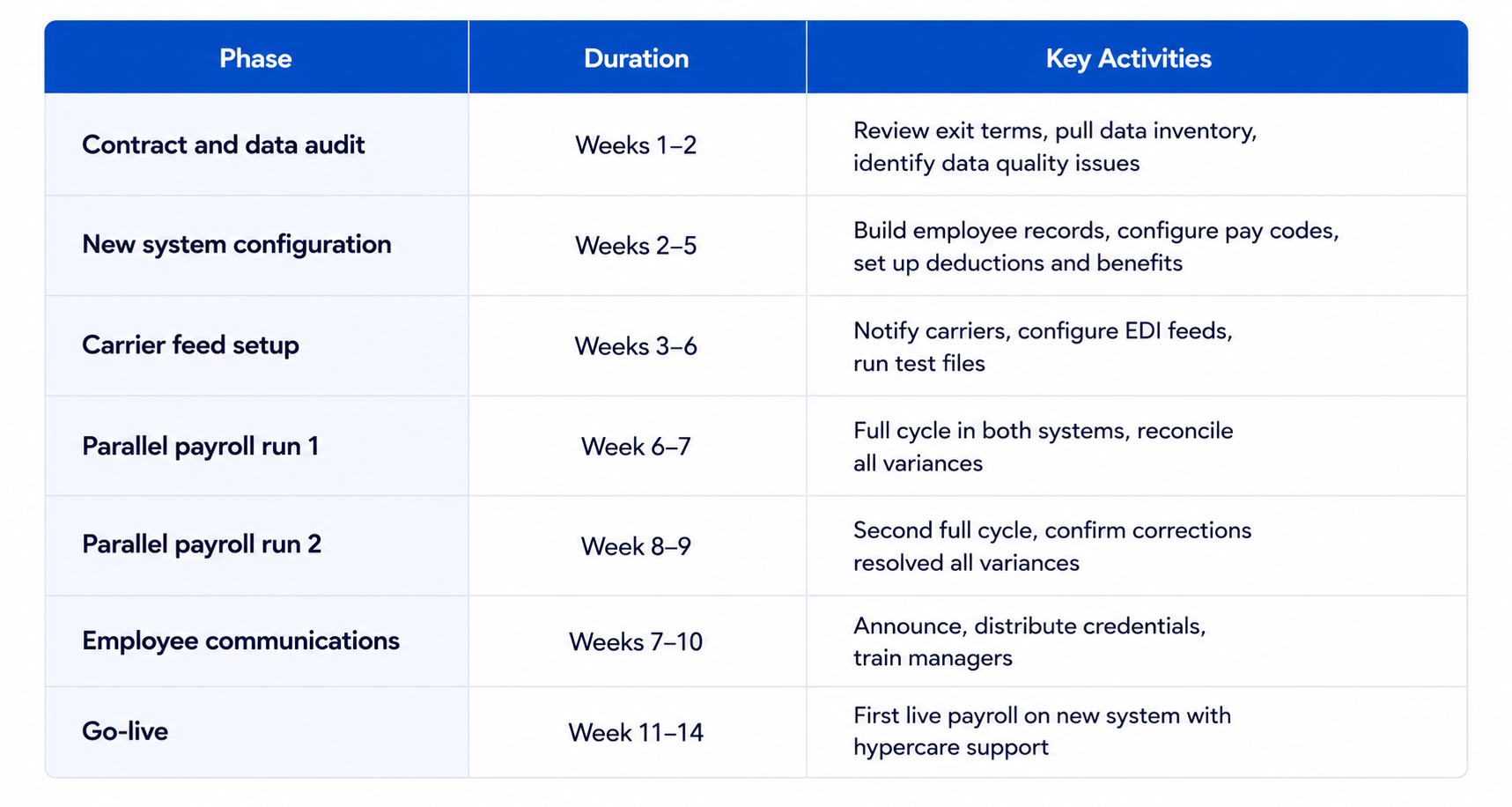
At this size, most HRIS vendors can configure the platform largely from their standard templates with limited customization. The bottleneck is almost always data preparation quality and carrier feed coordination — not system configuration.
Mid-Market Companies (200–1,000 Employees)
Realistic timeline: 14–22 weeks from contract to go-live
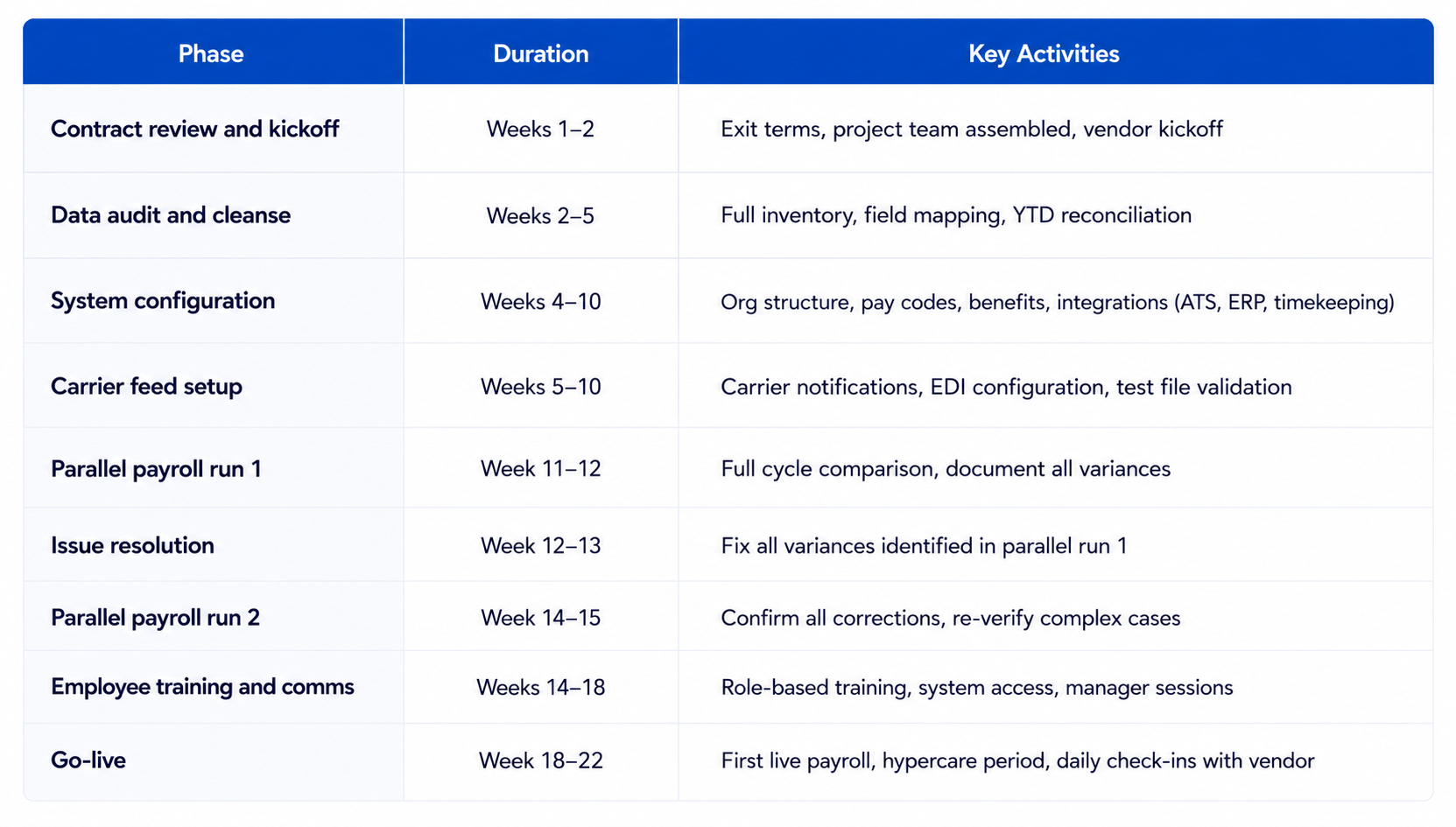
Integration complexity is the primary variable at this size. If you have a standalone timekeeping system, an ATS, a benefits administration platform, and an ERP, each integration requires its own configuration, testing, and validation timeline.
Enterprise Companies (1,000+ Employees)
Realistic timeline: 5–9 months from contract to go-live
Enterprise migrations are defined by volume (more records to validate), complexity (more pay codes, more multi-state scenarios, more custom configurations), and more stakeholders with competing priorities.
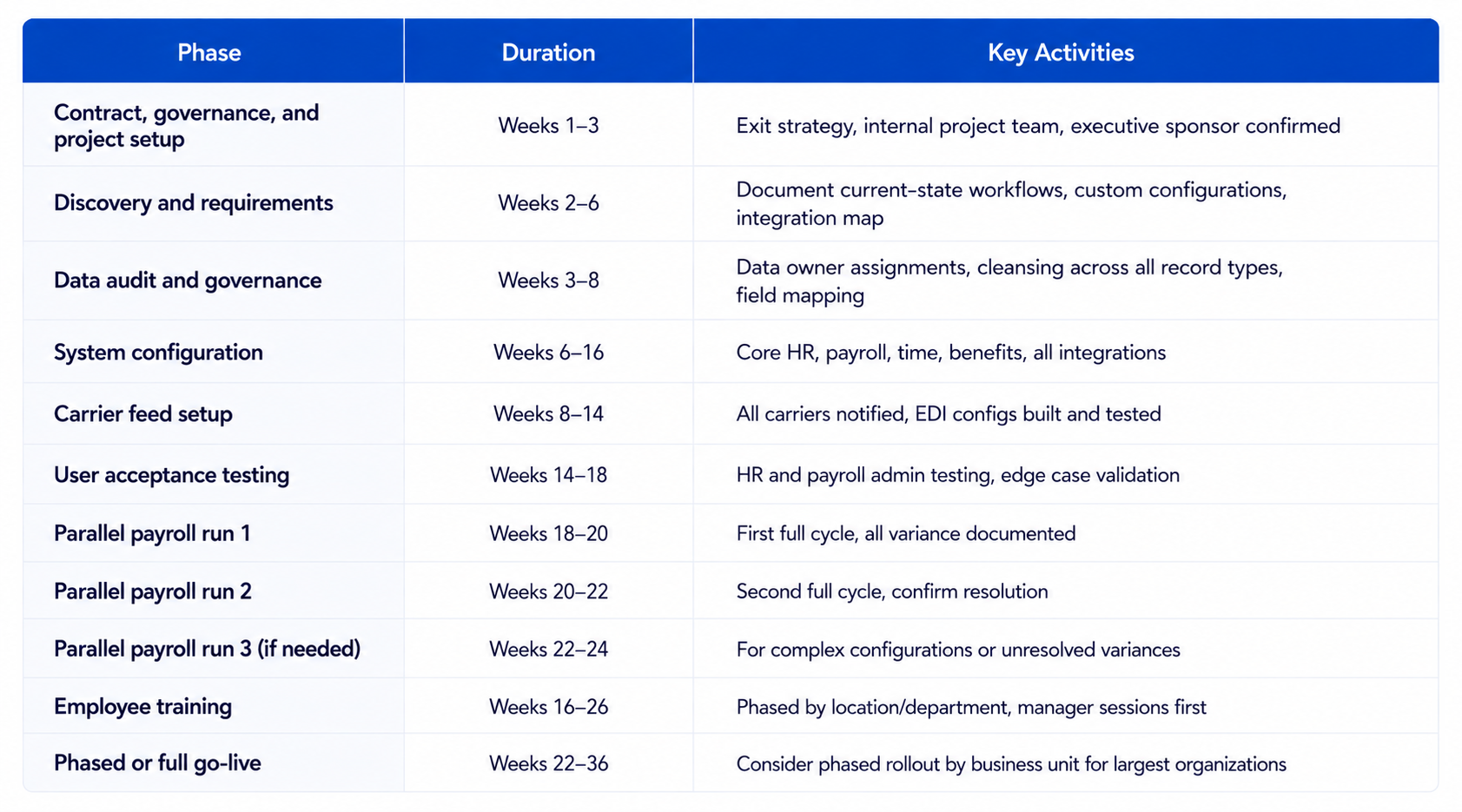
For organizations at this scale, phased go-lives — bringing one business unit or region live at a time while others remain on the old system — can reduce risk but add coordination complexity. Get alignment from your new vendor and implementation partner on their phased deployment experience before committing to this approach.
The Migration Checklist: What to Complete Before Go-Live
Use this as your sign-off document. Nothing should move to production without every item confirmed.
Data and Configuration
- [ ] Full data inventory completed and exported from current system
- [ ] Data cleansed — all known quality issues resolved
- [ ] Field mapping documented and validated between old and new system
- [ ] Employee master data loaded and verified in new system
- [ ] YTD payroll history loaded and reconciled
- [ ] All tax withholding configurations verified per employee
- [ ] Benefits enrollment data matches carrier records
- [ ] Direct deposit configurations loaded and verified
- [ ] PTO/accrual balances confirmed as of migration date
- [ ] All integrations (ATS, timekeeping, ERP) tested and confirmed
Payroll Validation
- [ ] Parallel payroll run 1 completed — all variances documented
- [ ] All variances from run 1 investigated and resolved
- [ ] Parallel payroll run 2 completed — no unresolved variances
- [ ] Edge cases validated (multi-state employees, leave cases, garnishments, exempt employees, contractors)
- [ ] Tax filing approach for current year confirmed (full year in new system, or split)
- [ ] Year-end W-2 strategy documented and agreed with new vendor
Benefits Carriers
- [ ] All carriers notified at least 60 days prior to go-live
- [ ] New EDI feeds configured for all carriers
- [ ] Test files sent and confirmed with each carrier
- [ ] Old feeds scheduled for termination on go-live date
- [ ] First live feed post-cutover confirmed and acknowledged by each carrier
Compliance and Legal
- [ ] Data portability exercised — full export from old system secured
- [ ] Old vendor termination notice served per contract terms
- [ ] Early termination fee, if any, confirmed and budgeted
- [ ] State new-hire reporting configuration confirmed in new system
- [ ] Workers' compensation code assignments validated
Employee Communications
- [ ] Migration announcement sent to all employees
- [ ] System access credentials distributed
- [ ] Manager training completed before go-live
- [ ] HR admin training completed before first live payroll
- [ ] Go-live confirmation message prepared and scheduled
- [ ] Help desk or HR support contact published
The Most Common Migration Mistakes — and How to Avoid Them
- Running only one parallel payroll cycle. One run catches obvious configuration errors. It does not catch errors that only surface in certain pay scenarios (overtime thresholds, commission cycles, mid-period rate changes). Two runs are the minimum. Three are the right call for complex organizations.
- Migrating dirty data. Vendors and implementation partners can only work with the data they're given. If your current system has five years of accumulated errors — wrong work locations, stale withholding elections, benefits enrollment mismatches — those errors will be faithfully replicated in your new system. Data cleansing is your responsibility, not the vendor's.
- Failing to reconcile carrier enrollment data before migration. Carriers maintain their own enrollment records. If their file diverges from your HRIS (which happens more often than most HR teams expect), migrating without reconciliation means you're making a permanent record of that discrepancy. The time to fix it is before migration, not after employees start getting incorrect EOBs.
- Announcing the switch too late. Employees who are told about a system change with less than two weeks' notice assume something went wrong. The announcement timeline matters as much as the technical timeline.
- Treating go-live as the finish line. The four to six weeks after go-live — the hypercare period — are when most migration problems surface. Keep your project team assembled, maintain daily check-ins with your new vendor, and don't close out the migration project until you've successfully processed at least two live payroll cycles with no unresolved exceptions.
Working With OutSail on Your Migration
OutSail's implementation support service is specifically designed for organizations executing HRIS vendor switches — whether planned or urgent. We help HR teams build realistic migration timelines, identify implementation partners with proven track records at your scale, and maintain a structured review process through the parallel payroll and go-live phases.
Our advisors have guided organizations through hundreds of HRIS migrations. We know where the surprises occur, how to prevent most of them, and how to resolve the ones that can't be avoided.
For more on what makes HRIS implementations succeed and fail, OutSail's step-by-step HRIS implementation guide and complete guide to HRIS data migration provide the detailed operational context to complement the migration playbook above.
Conclusion
The organizations that stay on underperforming HRIS platforms too long are rarely doing so because they lack better options. They're doing so because switching feels more frightening than staying.
The playbook above is evidence that it doesn't have to be. Parallel payroll runs verify your new system before a single real paycheck runs through it. Data cleansing before migration ensures you're not carrying old problems into new infrastructure. Carrier feed sequencing prevents the coverage gaps that surface three weeks after go-live when an employee tries to use their insurance. A clear employee communication plan converts what could be a disruptive surprise into a managed transition.
None of this is simple. All of it is learnable. And done correctly, a well-executed HRIS migration doesn't just replace a platform — it resets your HR operations on a foundation that actually serves the organization for the next several years.
Ready to Plan Your Migration?
OutSail's implementation advisory team helps HR organizations of every size build migration playbooks, identify the right implementation partners, and maintain payroll continuity through the full transition — at no cost to your organization.
Schedule a migration planning call with an OutSail advisor →
Frequently Asked Questions
How long does it take to switch HRIS vendors without disrupting payroll?
The realistic timeline for switching HRIS vendors while maintaining payroll continuity depends primarily on company size and payroll complexity. Small companies (50–200 employees) should plan for 8–14 weeks from contract signing to go-live. Mid-market organizations (200–1,000 employees) should budget 14–22 weeks. Enterprise companies (1,000+ employees) typically require 5–9 months, including discovery, configuration, integration testing, parallel payroll runs, and change management. Vendors who promise significantly shorter timelines should be asked for references from customers at your size who completed migration in that window. Most timeline surprises stem from data quality issues and carrier feed coordination — not system configuration.
What is parallel payroll and why is it necessary for HRIS migration?
Parallel payroll is the practice of processing a complete payroll cycle in both your outgoing and incoming systems simultaneously — comparing outputs line by line to identify discrepancies before real employee paychecks run through the new system. It is the primary risk-management mechanism in any payroll migration. Parallel payroll doesn't mean paying employees twice; the old system continues to issue actual paychecks while the new system processes the same period in simulation. A minimum of two complete parallel cycles is standard practice. Three cycles are recommended for organizations with multi-state payroll, complex hourly workforces, mid-year compensation changes, or employees on modified-pay leaves of absence.
Can you switch HRIS vendors mid-year without creating W-2 problems?
Yes, but it requires explicit planning around year-end tax filings before implementation begins. The two standard approaches are: a full-year historical import (the new system ingests YTD payroll data from the old system and produces W-2s for the entire calendar year), or split W-2 production (each system produces W-2s for its respective period, and employees receive two forms). The historical import approach is cleaner and less confusing for employees, but it requires accurate YTD data migration and a clear agreement with your new vendor on the data format and reconciliation process. Confirm the W-2 strategy before signing your new contract, and build YTD reconciliation into your parallel payroll validation process. Avoiding Q4 migration windows (October–December) eliminates this complexity entirely.
What happens to benefits coverage when you switch HRIS systems?
Benefits coverage itself does not change when you switch HRIS systems — your insurance carriers remain the same. What changes is the mechanism by which enrollment data flows from your HRIS to your carriers. If the transition of EDI (Electronic Data Interchange) carrier feeds is not sequenced carefully, employees can experience coverage lapses or incorrect enrollment records at the carrier level — problems that typically surface when someone tries to use their insurance rather than at the time of migration. Preventing this requires: reconciling your HRIS enrollment data against each carrier's enrollment file before migration, notifying carriers at least 60–90 days before go-live, configuring and testing new EDI feeds in advance, and coordinating the termination of old feeds with the activation of new ones on the same day.
Should you switch HRIS vendors at a specific time of year?
January 1 is the best timing for an HRIS migration that includes payroll. Starting a new payroll system at the beginning of the calendar year eliminates the mid-year YTD reconciliation challenge and aligns with annual tax filing cycles. The start of a new quarter (April 1, July 1) is the next best option, minimizing tax reconciliation complexity. Mid-quarter migrations are workable but require careful planning. The period to avoid is Q4 (October–December): year-end payroll processing, W-2 preparation, open enrollment, and holiday staffing constraints all coincide to create maximum risk with minimum organizational capacity. If your business case demands a Q4 switch, pressure-test whether a January 1 go-live is achievable and consider whether a longer but cleaner timeline produces better outcomes.

.png)
